The comment sectionalready wrote yournext video.
Crowdtone reads up to 1,000 comments on any public YouTube video and writes back a plan: what to fix, what to film next, and a thumbnail that answers the loudest complaint. Connect your channel and it publishes the changes for you.
What the report shows for one video
One video, six views. The strip across the top holds the loudest signal, the mood of the room, and the count of changes waiting, so the state of the audience reads at a glance before you open anything.
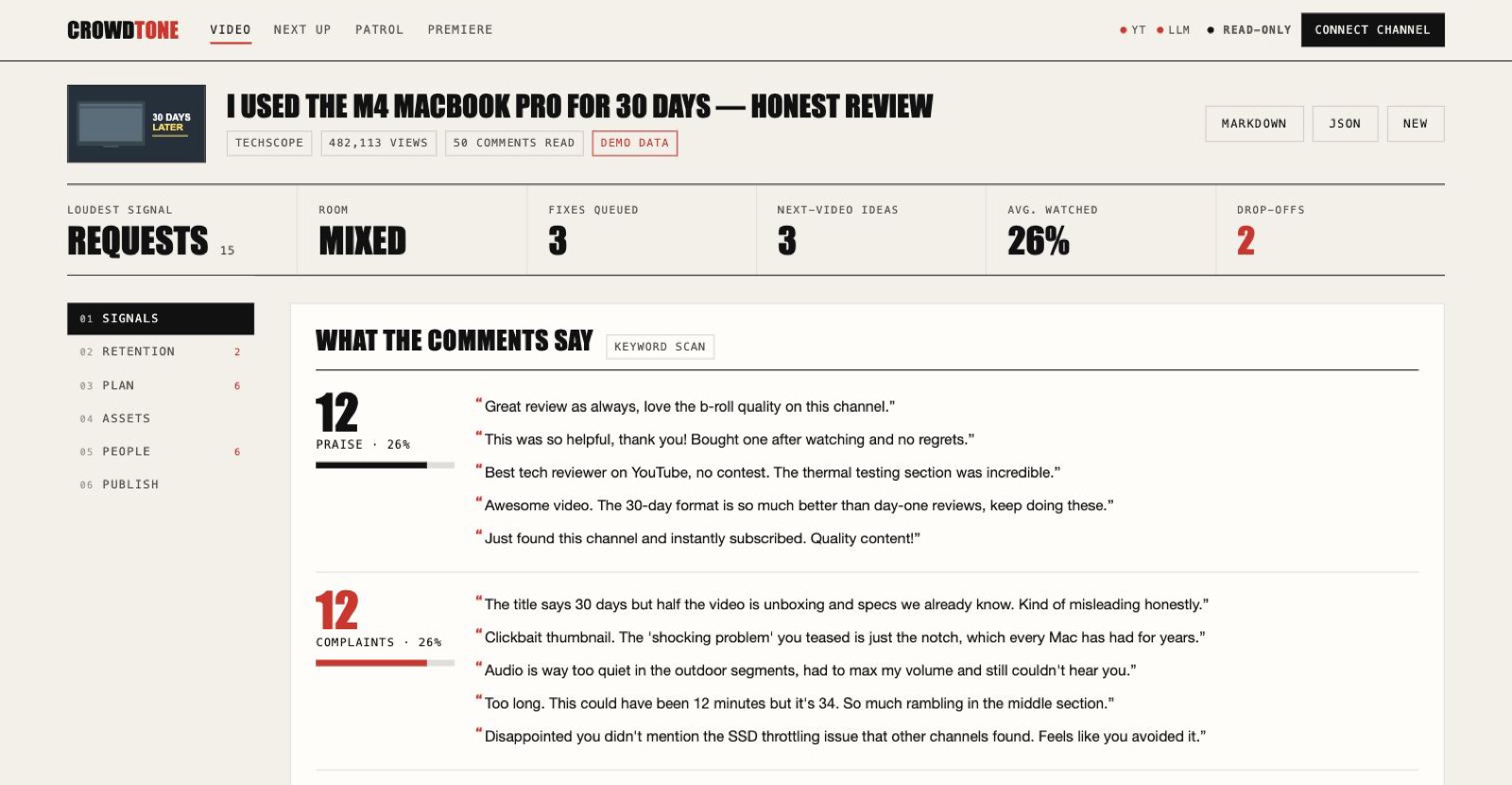
Signals. 50 comments sorted into four themes, counted, and quoted verbatim
Retention: where viewers left, and why
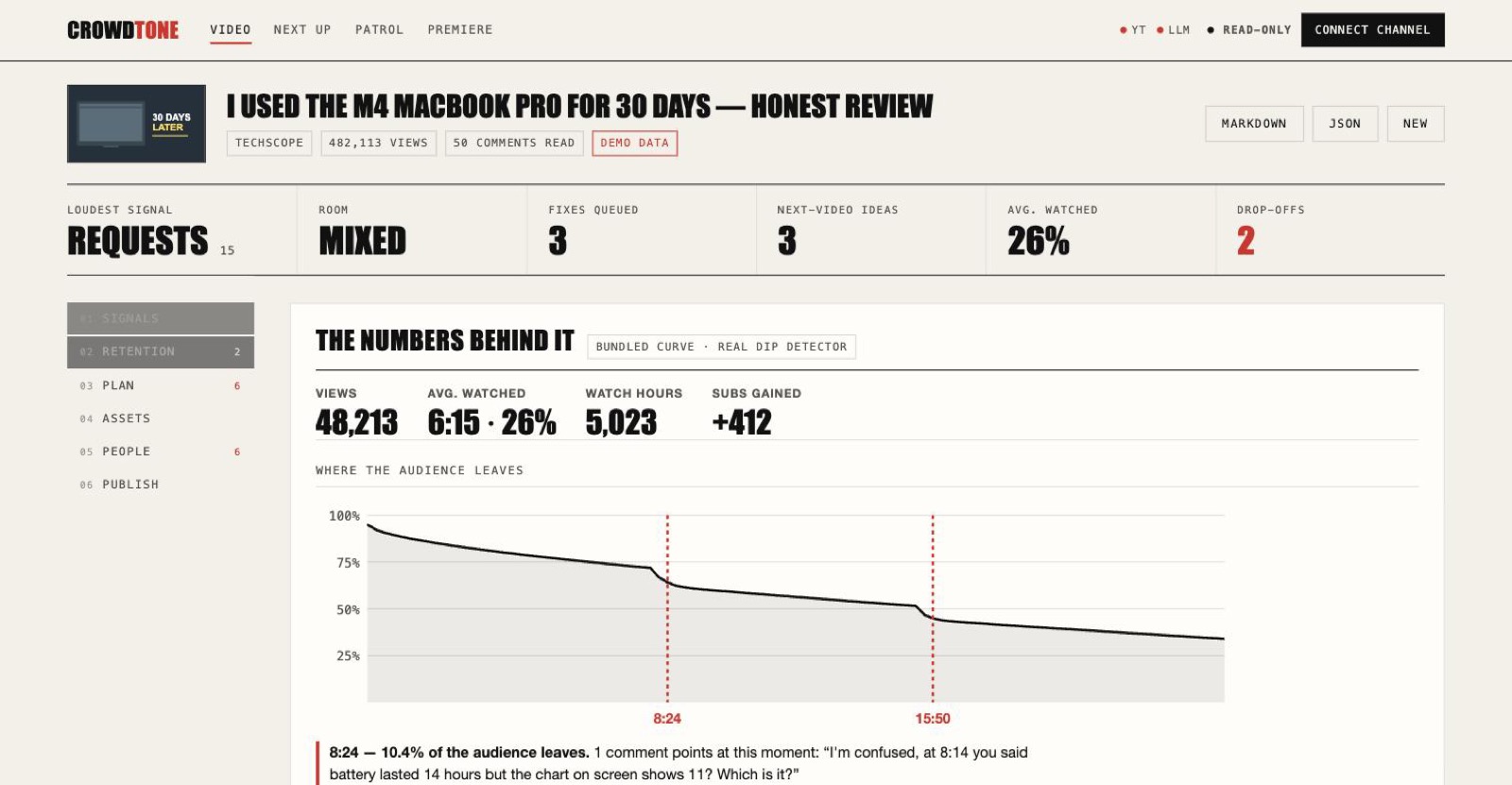
Drop-offs. Each dip labelled with the comment that names that timestamp
The YouTube Analytics API gives the curve. The comment section gives the reason. Crowdtone joins them at the second, then drafts the correction to pin and the chapter to add so viewers navigate instead of leaving.
Thumbnails redrawn from YouTube’s own stills

Published. What the viewer saw

Redrawn. Answering the top complaint, that the title oversold the video
Fourteen outputs, each with its evidence
Comment themes
Every comment sorted into praise, complaints, requests and confusion, with counts and the most-liked quotes under each.
Room sentiment
Every comment scored by a fixed lexicon, all 1,000 of them, so the same thread always draws the same chart.
Retention dips
Your sharpest drop-offs marked on the curve, each matched to the comment that explains why viewers left there.
Next-video brief
Three ideas ranked by how loudly the comments ask, each with a title, an opening hook, and the quotes proving demand.
Fix list
Changes worth making to the video you already published, every one tied to the comment that prompted it.
Thumbnail rematch
Three variants composited from YouTube's own preview stills, overlaid with a line answering the loudest complaint.
Shorts cut list
The moments viewers timestamped, with in and out points and an editor pack of markers, an EDL, and captions.
Translated packaging
Title and description rendered into the languages your analytics show, published as YouTube localizations.
Superfans
The viewers worth replying to today, ranked by arithmetic on likes, questions and timestamps rather than a model's guess.
Publish queue
Every finding written as finished copy: title, chapters, pinned comment, replies, thumbnail. Tick it, read the diff, confirm, undo.
Audience digest
The whole report folded into one email you could send weekly, composed in code from figures the report already proved.
Plan the next one
Channel-wide: twenty uploads scored against your own median views a day, ending in one video specified well enough to film.
Comment patrol
A sweep of recent uploads for impersonators, WhatsApp lures, crypto bait and paste-bots, hidden in bulk and reversibly.
Premiere co-pilot
Live chat triaged as it arrives: questions worth answering on air, scam bots hidden, and the seconds chat spikes timestamped.
How it works: five passes, about a minute
- Read
Video metadata and up to 1,000 top-level comments through the YouTube Data API, which costs ten of the 10,000 free quota units a day. Public data, no account required.
- Cluster
The comments are batched and a language model sorts each batch into the four themes. With no key configured, a keyword scan does the same job.
- Draft
Those clusters become next-video ideas, a fix list, thumbnail lines, and the finished copy of every proposed change.
- Redraw
YouTube's published preview stills are fetched and composited with the overlay text, so the report ends in pictures.
- Publish
Connect your channel and the changes you tick are written to YouTube, each previewable as a diff first and undoable after.
The fine print: data, keys and permissions
- Reading needs no accountVideo metadata and top-level comments arrive through the YouTube Data API as public data. No viewer accounts, ever.
- The demo runs on zero keysA bundled 50-comment dataset drives the whole pipeline, so the tool is reviewable without credentials.
- Thumbnails use YouTube's own stillsYouTube publishes three preview stills of every public video, so variants composite real frames. No yt-dlp, no ffmpeg. The demo video is fictional, so the samples above sit on a stand-in frame.
- Nothing is storedFetched comments are cached briefly to spare API quota. Your sign-in lives in one signed cookie, and signing out revokes it with Google.
- Writing is opt-in and scopedPublishing needs a Google sign-in and a second confirmation. Every write is checked against the channel you connected.
- The chapter engine is open sourceThe timestamp parser that mines chapters from comments ships separately as youtube-chapter-kit, MIT licensed with its own tests.
Run it on one comment section
Paste any public YouTube address, or run the bundled dataset with no keys at all.